ClickUp and Notion now cover a lot of the same ground. Both can manage projects, store documentation, automate workflows, build dashboards, and use AI across workspace content.
They still feel different in day-to-day use. ClickUp starts with a structured project hierarchy and a large set of dedicated PM features. Notion starts with pages and databases and leaves more of the setup up to you.
The gap has narrowed in 2026. ClickUp 4.0 reorganized tasks, Docs, Chat, Planner, and AI into a new interface. Notion now supports native sprints, dashboard views, forms, and more capable automations.
Below, we compare the current features, pricing, and day-to-day experience of both apps.
How we evaluated ClickUp and Notion
For this comparison, we set up projects with tasks, assignees, dependencies, and different views in both ClickUp and Notion. We also created project documentation, worked with databases and dashboards, and tested native automations in both products.
We also checked current product documentation and pricing from ClickUp and Notion. For issues that are harder to judge in short-term testing, we reviewed recent ClickUp reviews on G2, Notion reviews on G2, and recent Reddit discussions about performance and day-to-day use.
All product and pricing information was checked in October 2026.
ClickUp vs Notion at a glance
| ClickUp | Notion | |
|---|---|---|
| Best fit | Complex projects and structured operations | Docs, wikis, databases, and lighter projects |
| Ease of use | More built-in structure and more settings to learn | Simpler starting point, with more setup left up to you |
| Project management | Advanced tasks, Gantt, workload, sprints, and time tracking | Tasks, subtasks, dependencies, sprints, and timelines |
| Docs and wikis | Docs and wikis connected to project work | Flexible editor, nested pages, and dedicated wikis |
| Databases | Task-centered structure with custom fields and relationships | Flexible databases with relations, formulas, and rollups |
| Reporting | Detailed dashboards, workload, time, and sprint reports | Charts and dashboard views built around databases |
| Time tracking | Built in | Requires another tool |
| Automation | Extensive project and task automations | Database automations, buttons, formulas, and webhooks |
| Team chat | Built in | Comments and discussions inside content |
| AI | Brain AI available as a paid add-on | Main AI features included with Business and Enterprise |
| Offline use | Create new tasks and view previously opened tasks and notes | Download and edit pages offline |
| Free plan | Unlimited members and tasks; 60 MB storage | Unlimited for individual use; 1,000-block limit with 2+ members |
| Paid plans | Unlimited $7/user/month; Business $12/user/month (annual billing) | Plus $10/member/month; Business $20/member/month (annual billing) |
Prices shown use annual billing.
ClickUp vs Notion for project management
ClickUp is better suited to complex project management. Tasks can include subtasks, custom statuses, priorities, dependencies, estimates, recurring schedules, custom fields, and tracked time. The same work can appear in List, Board, Calendar, Timeline, and Gantt views.
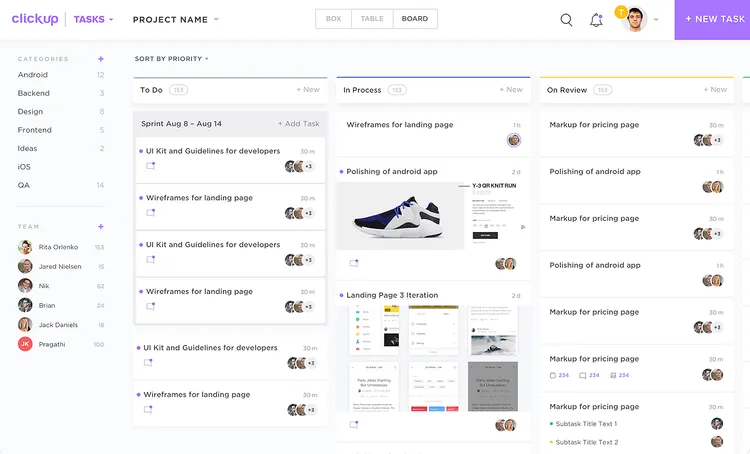
ClickUp also gives managers more ways to see work across several projects. Workload view shows capacity over time, while native time tracking feeds into timesheets and reports.
Notion has improved substantially as a project management tool. Task databases support assignees, due dates, subtasks, and dependencies. Its sprint system includes a backlog, current sprint, planning views, and automatic sprint creation and completion.
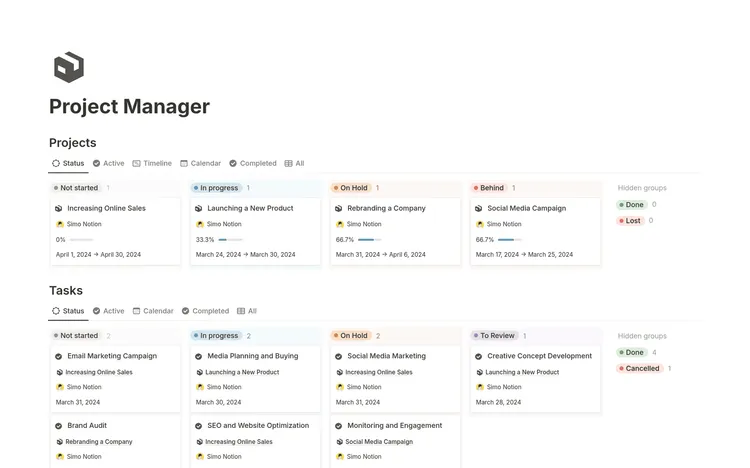
The biggest differences show up once projects get more demanding:
| Feature | ClickUp | Notion |
|---|---|---|
| Subtasks | Yes | Yes |
| Dependencies | Yes | Yes |
| Sprints | Yes | Yes |
| Gantt planning | Dedicated Gantt view | Timeline view with dependencies |
| Workload planning | Built in | Custom setup required |
| Time tracking | Built in | No native time tracking |
| Timesheets | Built in | No |
For simpler projects, both apps cover the basics well. ClickUp pulls ahead when you need resource planning, tracked time, more detailed scheduling, or reporting across several projects.
Docs and knowledge management
Notion has the advantage for documentation and knowledge management. A Notion page can hold a document, meeting note, project brief, or database entry. Pages can be nested and linked freely, while wikis add page owners and verification dates for content that needs regular review.
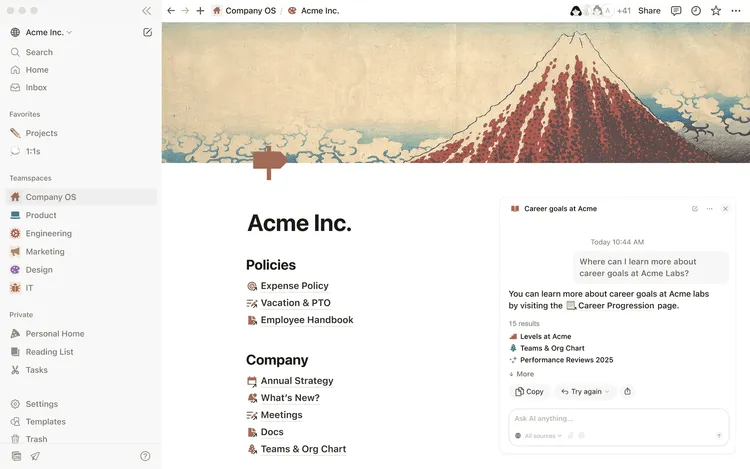
Databases also work closely with docs. A project record can have properties such as owner and status at the top while holding the full brief, notes, and decisions inside the page itself.
ClickUp Docs support collaborative editing, nested pages, comments, sharing, and wikis. Docs can also connect directly to tasks, making them useful for briefs, processes, and project documentation.
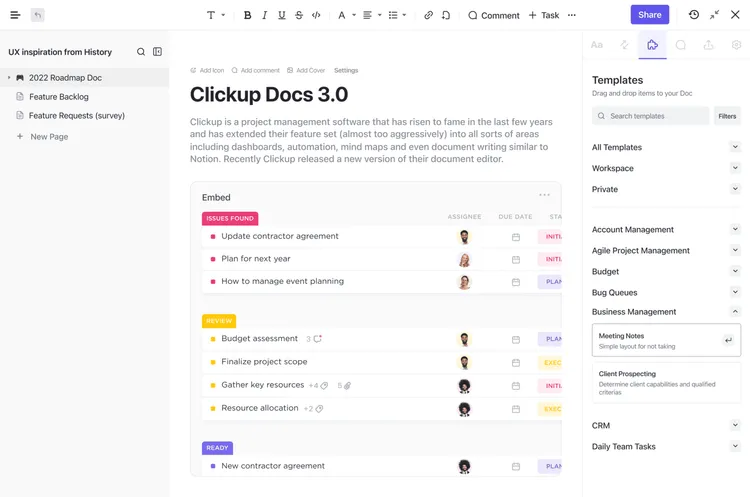
ClickUp Docs cover documentation that mainly supports project work. Notion gives a larger knowledge base more room to develop outside the task hierarchy.
Databases and workspace structure
Notion offers the more flexible database system. Notion databases can hold tasks, customers, applicants, content, research, assets, meeting notes, and other structured information. Every record is also a full page.
Relations connect databases, rollups pull information from related records, and formulas calculate new values. The same data can appear as tables, boards, calendars, galleries, timelines, charts, or dashboards.
ClickUp uses a more fixed hierarchy: Workspace -> Space -> Folder -> List -> Task -> Subtask
ClickUp's hierarchy gives project work a predefined structure. Custom fields add dates, numbers, dropdowns, formulas, relationships, progress, and other information inside it. That setup works well for records that behave like work items. Notion is more flexible when the information does not naturally belong inside a task hierarchy.
Reporting and dashboards
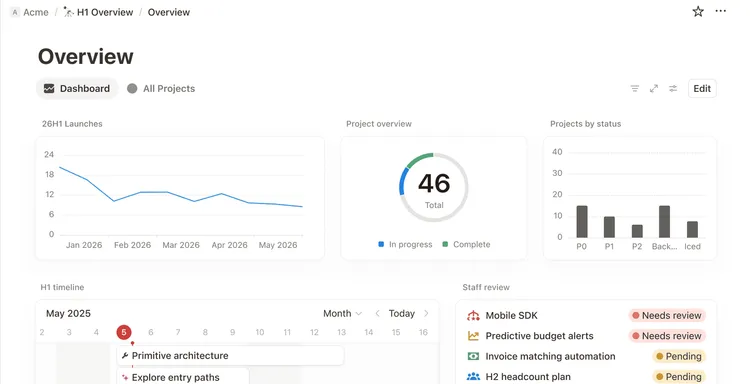
Notion now has dedicated Dashboard views on Business and Enterprise plans. A dashboard can combine charts, tables, boards, calendars, and timelines, with global filters across compatible widgets.
ClickUp dashboards go further for operational reporting. The Business plan includes advanced dashboard cards, sprint reporting, and portfolio workload management. Time-tracking data can also be used in reports and timesheets.
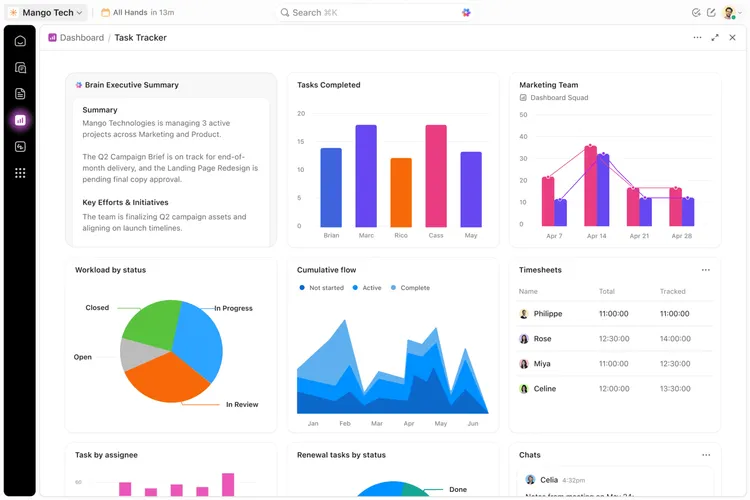
Notion dashboards are useful for database-driven status reports and overviews. ClickUp has more dedicated data for capacity, tracked time, and project performance.
Automations
Both apps have native automation, though ClickUp goes further for project workflows.
| ClickUp | Notion | |
|---|---|---|
| Property or status triggers | Yes | Yes |
| Scheduled triggers | Yes | Yes |
| Multiple actions | Yes | Yes |
| Webhooks | Yes | Yes |
| Form-triggered workflows | Yes | Yes |
ClickUp automations can assign work, update fields, change statuses, create tasks, send messages, and connect to external services. Under the established plans, Business includes 5,000 automation actions per month.
Notion database automations can update properties, create or edit pages, send notifications, post to Slack, and run webhook actions. Forms can feed responses directly into databases and trigger automations.
Notion has one important limitation: database automations cannot trigger other database automations.
ClickUp AI vs Notion AI
Notion AI
Notion Business and Enterprise include Notion Agent, AI Meeting Notes, and Enterprise Search. Custom Agents handle recurring work and can run on schedules or workspace events.
Custom Agents can read from Notion pages, databases, and selected connected apps, then update records or send messages.
Custom Agents use Notion credits. Monthly credits currently cost $10 per 1,000 credits and are shared across the workspace. Notion Agent, AI Meeting Notes, and Enterprise Search are included with Business and Enterprise.
ClickUp AI
ClickUp Brain works across tasks, Docs, Chat, and other workspace data. It can search workspace content, summarize information, generate text, and answer questions using models from OpenAI, Anthropic, and Google.
Brain AI costs $9/user/month and includes 1,500 AI Super Credits per user each month. ClickUp also offers Everything AI for $28/user/month, which adds AI Notetaker, AI Fields, AI Automations, AI Assign & Prioritize, image generation, and higher usage for Super Agents.
Additional AI Super Credits cost $10 per 10,000 credits. They are used by automated AI features such as Super Agents, AI Fields, and AI Automations.
Ease of use and day-to-day experience
Notion is usually easier to pick up at the beginning. A page starts simple, and databases or automations can be added later.
ClickUp exposes more of its structure early. New users need to understand Spaces, Folders, Lists, tasks, statuses, views, dashboards, and other settings. ClickUp 4.0 has simplified some of the navigation, but there is still a lot in the product.
Notion can become difficult to maintain once a workspace accumulates many databases, linked views, relations, formulas, and templates.
What users report
Recent user feedback reflects both problems.
- ClickUp: G2 reviews frequently praise its task management and flexibility, while learning curve and slow loading remain common complaints. G2 currently lists "Learning Curve" and "Slow Loading" among recurring review themes.
- Notion: Recent G2 reviews often praise the clean interface and flexible databases. Reviewers also mention that large or complex workspaces can become harder to manage and occasionally slower.
Performance also comes up on Reddit. In September 2026, a ClickUp user from an 11-person studio described long waits for larger views and dashboards. Another June thread reported slow initial loading across several browsers and accounts.
The same issue appears in the Notion community. An October 2026 thread asked why basic page loading, database switching, and search still felt slow. Another recent user described delays with page loads and database filters.
These are individual reports rather than controlled performance tests. They are useful signals if you expect a large or complicated setup.
Chat and collaboration
ClickUp Chat includes channels and direct messages. Messages can be connected to tasks, and ClickUp Brain can summarize threads.
Notion keeps most communication attached to content through comments, mentions, and discussions inside pages and database entries.
ClickUp can replace part of a separate team-chat workflow for some organizations. Notion keeps conversations closer to the document or record they concern.
Mobile and offline use
Notion offers more complete offline support. Notion lets desktop and mobile users download pages and edit them without a connection. Paid plans also automatically download recently visited and favorited pages. When a database is downloaded, the first 50 rows of its first view are stored for offline use.
ClickUp Offline Mode works on the web, desktop app, and mobile. New tasks can be created offline and sync after reconnecting. Previously opened tasks and notes remain available to view, but existing tasks and notes cannot currently be edited offline.
ClickUp vs Notion pricing
Free plan comparison
Both apps have free plans, but they are aimed at slightly different use cases.
| ClickUp Free Forever | Notion Free | |
|---|---|---|
| Members | Unlimited | Unlimited for individual use; 1,000-block limit with 2+ people |
| Tasks / pages | Unlimited tasks | Unlimited pages and blocks for individual use |
| Storage | 60 MB | Files up to 5 MB each |
| Docs | Collaborative Docs included | Included |
| Project views | Kanban boards, Calendar, Sprint Management | Database views including tables, boards, calendars, and timelines |
| Forms | 1 form | Included |
| Version history | Limited | 7 days |
| AI | Trial access | Limited trial |
ClickUp Free Forever is unusually generous for collaboration. It includes unlimited members and tasks, collaborative Docs, Kanban boards, Sprint Management, Calendar view, basic custom fields, and one form. The main limitation is storage, which is capped at 60 MB.
Notion Free is stronger for individual use. A one-person workspace gets unlimited pages and blocks, 7 days of page history, offline access, and file uploads up to 5 MB each. Once a Free workspace has two or more members, content creation is limited to 1,000 blocks.
That makes ClickUp's free plan more practical for a small group that wants to collaborate without paying. Notion Free is a better fit for personal use, especially for notes, databases, and lightweight project tracking.
Paid plans comparison
| ClickUp Unlimited | Notion Plus | ClickUp Business | Notion Business | |
|---|---|---|---|---|
| Price per user/month | $7 | $10 | $12 | $20 |
| 10 users/month | $70 | $100 | $120 | $200 |
| Main AI features | Brain AI +$9/user/month | Limited trial | Brain AI +$9/user/month | Included |
ClickUp has the lower base price. With Brain AI added, ClickUp Business costs $21/user/month, compared with $20/member/month for Notion Business, which includes its main AI features. ClickUp also offers Everything AI for $28/user/month for heavier use of automated AI features.
Which should you choose?
Choose ClickUp if
- Project and task management are the main reason you need the app.
- You need native time tracking or workload planning.
- Reporting across several projects is important.
- Your workflows depend heavily on automation.
- Built-in chat could replace part of your current tool stack.
Choose Notion if
- Docs, wikis, and knowledge management are central to the setup.
- You need flexible databases for information beyond tasks.
- Your projects do not require advanced resource planning or time tracking.
- You prefer to build your own structure instead of starting with a fixed project hierarchy.
A simpler alternative to ClickUp and Notion
Nuclino is a simpler, faster alternative for teams that mainly need shared knowledge and lightweight project management. It combines docs, wikis, projects, and collaborative whiteboards in one workspace. Project work can be tracked with boards, fields, and assigned tasks, while documentation stays alongside it.
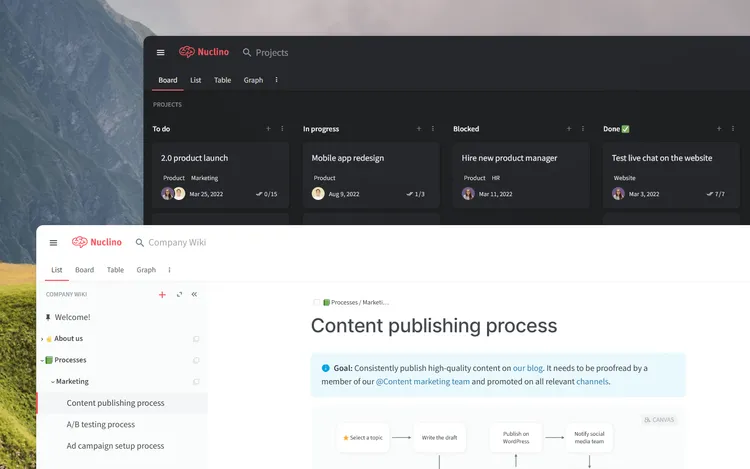
Nuclino also includes AI for working with workspace content and an MCP server for connecting compatible AI assistants.
ClickUp offers more depth for resource planning, time tracking, and complex project management. Notion has more advanced database functionality. Nuclino keeps the setup lighter for teams that do not need those features.
You can also browse more ClickUp alternatives and Notion alternatives.
ClickUp vs Notion FAQ
Is ClickUp better than Notion for project management?
ClickUp has more dedicated project management features, including native time tracking, workload views, Gantt charts, detailed dashboards, and more advanced reporting.
Notion supports tasks, subtasks, dependencies, sprints, timelines, and project dashboards. It is a good fit for lighter projects that stay closely connected to docs and databases.
Is Notion better than ClickUp for documentation?
Notion is generally better suited to large collections of docs and internal knowledge. Its nested pages, wikis, flexible databases, page owners, and verification features give documentation a larger role.
ClickUp Docs work well for briefs, processes, and other documents tied closely to project work.
Is ClickUp cheaper than Notion?
Yes, if you compare the standard paid plans without AI. ClickUp Unlimited costs $7/user/month with annual billing, compared with $10/member/month for Notion Plus. ClickUp Business costs $12/user/month, compared with $20/member/month for Notion Business.
The comparison changes if you add AI. ClickUp Brain AI costs another $9/user/month, while Notion Business includes its main AI features.
Does Notion have dashboards?
Yes. Notion has native Dashboard views on Business and Enterprise plans. They can combine charts, tables, boards, calendars, and timelines, with shared filters across compatible widgets. ClickUp has more project-specific reporting around workload, tracked time, sprint data, and project performance.
Does Notion have Gantt charts?
Notion has Timeline views with task dependencies. ClickUp has a dedicated Gantt view with more project scheduling features.
Is ClickUp or Notion better for personal use?
Notion is usually easier for personal notes, planning, research, trackers, and simple projects. ClickUp fits personal workflows that revolve around detailed task management, recurring work, deadlines, and time tracking.
Can ClickUp and Notion work offline?
Both have offline functionality. Notion lets you download pages and edit them offline in its desktop and mobile apps. ClickUp lets you create new tasks offline and view previously opened tasks and notes, but existing tasks and notes cannot currently be edited offline.
Can you use ClickUp and Notion together?
Yes. Some teams use ClickUp for project delivery and Notion for documentation or a company wiki. The main downside is having context split across two systems. Using both works best when each app has a clearly defined role.